It has been a while since I posted my last entry, but with the upcoming new netbook OS's it seemed to be the right time to get back into blogging.
I have tried both: Moblin and Jolicloud. Both are different OS's and have there own strengths. I will not tell you about bugs, hang ups, because both OS's haven't reached final release yet. Moblin is in Beta and Jolicloud in Alpha release.
Let's get started. Well as for Moblin, you can just download the image, put it on an usb-stick and install or test run. As for Jolicloud you'll need an invitation, which you can ask on there site. On the other hand, Moblin doesn't run on a whole lot of machines, certainly not those small screen netbooks (like EeePC701 with a 800x480 screen). That may already be a very good point, considering your choice.
Let's start with Moblin. This one, actually is a complete new Linux Distribution. It doesn't look, feel or handels like any other Linux distro (but it still is one). Claiming it is a new OS is completely wrong, as for Jolicloud, same story. Both are Linux. Moblin went for the looks. They got a completely new GUI, never seen before. clean, simple and very intuitive. Actually, I think, this is the way GUI on netbooks should look.
Moblin made a choice: simplicity. All you need on a netbook is: a browser, an instant messenger, a status reporter, PIM and media. A very smooth taskbar which gives you access to all those programs and a home screen with all your favourites summed up. No more, No less. But if you want more, you can install more.
Now Jolicloud, that is a completely different story. This Distro is based on Ubuntu NBR, even the GUI has Ubuntu NBR written all over it. But, don't get fooled. Jolicloud has it's own repositories. Now the biggest difference I could see, is that jolicloud actually runs as a program on top of the distro.
What is it? well to me it feels like a manager to install programs, but with the advantage of storing the configuration files on-line. This way you can reinstall or install it on an other netbook and keep all of your installed programs and there configs. Very handy, because you will only need to make your configurations once.
The other smart thing is, that is makes use of prism. This way, you can add internet sites to your desktop as they would be standalone programs. Combining this with maximized windows and it really feels like your using a program instead of a browser. Well and that's about it.
Now which one should you download? None of both. As stated above, they or not in final release yet. I used both, and sometimes they got buggy. Before I left for my holidays, I reinstalled ubuntu 9.04, just to be sure I wouldn't get stuck.
But let's forget for a minute that those distro's are in alpha or beta. Which one should you get your hands on. Well as for Moblin you can start downloading it right now. Jolicloud won't let you do that, you'll need an invitation code. You can ask one, on there website and then you'll have to wait, wait and wait some more. After a month or so, you'll be Jolicouded and get the download code.
But seriously which one should you go for? In my opinion? They should bring out a mix of both ditro's. Because I like the GUI Moblin (very very much), but I really love the special thing Jolicloud does (but I don't like the GUI). My guess is, that changing the GUI of Jolicloud is something that would be much easier to do, than making out of Moblin a Jolicloud alike. So for now, you'll have to go for the looks of an Italian sports car, or the "easy to use" of a Swedish car, but you can't have both for now.
links:
Jolicloud: http://www.jolicloud.com/
Moblin: http://moblin.org/
Thursday, August 6, 2009
Moblin or Jolicloud
Thursday, March 12, 2009
CeBIT 2009: ASUS, secrets not on the Flyers
As you all know, Asus had a very big stand on CeBIT 2009. Lot's of new stuff, we already knew about, but now had the change to touch. And I really mean touch. Lot's of EeePC T91 and Eee PC T101H to try out. Very nice of ASUS.
And yes, a "new" concept: no keyboards, only 2 screens. Behold, the dual-screen-notebook.
Also the Eee keyboard, the Eeetop and the Eee box B202, B204 and B206 were there to touched, alltough the Eee keyboard was keept behind big locks. Only on demand it came out of its cave and no touchy touchy.
I could post some more video's an pictures, but make google your friend and you'll find plenty of those on the net. What I'm about to tell you, is probably not that easy to find on other places.
The first day on CeBIT, I just tried to see as mutch as possible. The second day, I started to ask questions. So on the Asus stand, I went to an Asian looking guy and started asking questions. At first that person didn't feel much in anwsering my questions. But he came along, and this is what I found out.
NO MORE LINUX on the new devices. I asked this question because I wanted to buy a Eeebox B206 (this should do HD), but no go for Linux. The Asus person even told me I wouldn't be able to put Linux on it. Why? problems with the drivers for some components. He even told me (of the record), it is not only the graphics chipset that distinguishes the B202 from its two other brothers (B204 and B206). And the drivers were the main problem to get Linux on those devices. His advices: Buy a B202 model. Is this true? Time will tell.
Now about the Eeekeyboard, no linux on it for sure, but this thing is only a prototype. I might come out, it probably will come out, but they are still developing the gadget. And for now, it won't do anything (yet?)
And what about the dual-screen-notebook? Should I still remind you: No Linux. Well The dual-screen is not more than actually 2 screens put together. There is no computer in it. It's only a showcase. Not for real. They even don't know if it will ever come out.
So what should you remember of this: No more Linux for ASUS. Damn, one of the reasons I loved ASUS is gone now. But there are enough brave souls out there, that will find there way to put linux on all Asus devices.
CeBIT 2009: ASUS, secrets not on the Flyers
Friday, January 9, 2009
Even more Eee, the Eee PC D200
Well ASUS doesn't seem to stop putting Atom processors in every device they can think of. The Eee PC D200 seems to be some kind of NAS, media server, small computer kind of thing.
Facts that might be right (no official release yet):
- Atom N270
- 2GB DDR-533
- 512MB flash-rom
- 3.5-inch touch-sensitive LCD
- 6-channel HD audio out
- DVI
- SlotIn-Multidrive
- 2x 3,5″ HDD-Slots
- 4x GbE lan
- 1x GbE Wan
- 802.11n access point
- 4x USB
- 275mm X 96 mm X 206 mm
source: www.einfach-eee.de
Even more Eee, the Eee PC D200
Thursday, December 18, 2008
Mounting a cellphone through bluetooth on the EeePC
Before you start following this blog entry, make sure bluetooth is working and your computer is all set for pairing your device. So this time I will explain how you can mount your cellphone, and browse your phone as if it were an internal disk. But before we start, You must know that browsing over bluetooth isn't the fastest way. Make sure your browser only shows lists and doesn't show icon's. This might speed things up. Or you could use a non graphical file browser like midnight commander or if you want a GUI without the icon's, you could try Krusader
Time to do some mounting. We do need several packages, so that we will be eable to mount a cellphone. We will be using the Obex file system, so you'll have to make sure your phone is capable of using obex. It's not that hard to find out, whether your phone can handle obex or not.
sdptool search --bdaddr AA:BB:CC:DD:EE:FF 0x1002
Replace the macaddress by the one of your phone. You will see a lot of services. You'll have to find the channel number for "OBEX File transfer" service.
Now you'll have to check if you have fuse-utils, libopenobex1 and obexfs installed. On the EeePC with xandros, you'll have to download the obex files, because they are not in the repositories, and install them manually.
wget http://ftp.nl.debian.org/debian/pool/main/libo/libopenobex/libopenobex1_1.3-3_i386.deb
wget http://ftp.nl.debian.org/debian/pool/main/o/obexfs/obexfs_0.10-3+b2_i386.deb
sudo dpkg -i libopenobex1_1.3-3_i386.deb
sudo dpkg -i obexfs_0.10-3+b2_i386.deb
Let's mount the phone for the first time. We will have to pair both the EeePC and the phone and therefore we need the passkey-agent. Replace the pin with the one you have put in the givepin script, the mac-addr. and the channelnumber (the x in -Bx). The phone will ask you a pin number.
Rember, bluetooth is slow, so give it time while browsing the device. The next time you mount, you won't need to run the passkey-agent again (pairing has been done). Trying to put this into /etc/fstab, doesn't work. There is some bug in the obexfs, so that unmounting as user keeps failing, but you could make a script that checks if the phone has been mounted or not and than does the opposite.
mdkir /home/user/phone
./passkey-agent --default 1234 &
obexfs -b AA:BB:CC:DD:EE:FF -Bx /home/user/phone
ls /home/user/phone
fusermount -u /home/user/phone
Mounting a cellphone through bluetooth on the EeePC
Wednesday, December 17, 2008
Huawai E270 HSPA USB modem on EeePC
When I ordered my new EeePc 901, I got price for the EeePC 901 GO, but recived the one without the GO. The pricee was OK, so I didn't want to send it back, but still the company I bought the EeePc from, wanted to correct there mistake. So they have send me an USB modem, of which I told them would work with linux. How very nice.
I had to put my sim into the modem, connected it to my Eeepc and voila. The modem was recognized and an application was fired up. I only had to change the APN to mworld.be and I was ready for some surfing.

Just for the record. I made the picture with my phone, transfered it with bluetooth to the EeePC and then went online using the modem to make this post, using my bleutooth mouse.
Huawai E270 HSPA USB modem on EeePC
Connecting bluetooth mouse, keyboard and other hid devices.
It isn't that hard to get a mouse, a keyboard an even some cellphones, working as an input devices through bluetooth. These are all HID devices and do work out of the box. As for your cellphone, you have to make sure it supports HID. You can check this easly, but make sure you use your phones mac-addr.
sdptool search --bdaddr AA:BB:CC:DD:EE:FF 0x1002
Before we can actually use HID, we have to make sure it has been turned on. So edit the file /etc/default/bluetooth and enable the hid daemon.
HIDD_ENABLED=1
Now you will have to restart bluetooth
/etc/init.d/bluetooth
Let's pair out device with our computer. This time we don't need the passkey, because hidd devices don't use pairing, or the key has been set to "0000". If you do encouter problems, use the passkey-agent. Change the mac-addr.
sudo hidd --connect AA:BB:CC:DD:EE:FF
That's all folks and your device will even work on reboot. Just put it "on" and press a button to make the connection. If you need the passkey-agent, use the following commands. Don't forget to replace the PIN with the one you have put in givepin and again change the mac-addr.
./passkey-agent --default 1234 &
sudo hidd --connect AA:BB:CC:DD:EE:FF
Connecting bluetooth mouse, keyboard and other hid devices.
Friday, December 12, 2008
Bluetooth application on EeePC 901 not that solid.
Not only the bigger screen, but also having a internal BT, did me decide to buy an other EeePC. BT really is my thing, we are using these a lot at the company I'm working. I have to admit, it's mostly Windows, but at home, I'm using it in combination with Mythtv and a mouse, keyboard and my cellphone as a nice and handy remote.
Testing out BT on the new EeePC, gives a very positive impression. But, it doesn't seem to be as solid as I had hoped for. It keeps losing connection and it doesn't reconnect a hid device by itself, you have to reconnect over and over again.
Didn't take me long to find out the Eeepc 901 isn't using Bluez, but something else, AzureBT. Even more, you can't set up a PAN with other devices. So, maybe it would be beter to use Bluez after all. I found some information on an other blog.
So I'll tell you very fast, hoping you know your way around linux, how to change from AzureBT to the Linux Bluez stack.
- make sure BT is active (switch with fn + F2)
- first quit the EeePC's BT application (if it's running, see blue icon in taskbar)
- remove azurebt: sudo apt-get remove azurebt
- update the dependencies: sudo depmod -a
- we need 2 deamons at boot: sudo vim /etc/fastservices
- and add: dbus bluetooth (each on one line starting with dbus)
- let's install bluez: sudo apt-get install bluez-utils
- we need to reboot, so that the modules and the deamons get loaded at boot
that's all, now you can test if bluetooth is working with:
- hciconfig dev (you will get the BT address)
- hcitool scan (now you will scan other BT devices)
If you are not able to use those two commands, something went wrong. In the next post I will explain how to get devices paired and how to connect them.
Bluetooth application on EeePC 901 not that solid.
Thursday, December 11, 2008
EeePC901 review in Dutch.
Because I didn't feel like making a review on the new EeePC 901 I'm using nowadays, I decided to borrow it, to someone who has even made a website on these small notebooks.
Well If you want to know more about the EeePC 901, go check the review. It's in Dutch, that shouldn't stop you.
EeePC901 review in Dutch.
Friday, November 28, 2008
2009 will be the year of the Box's and Top's
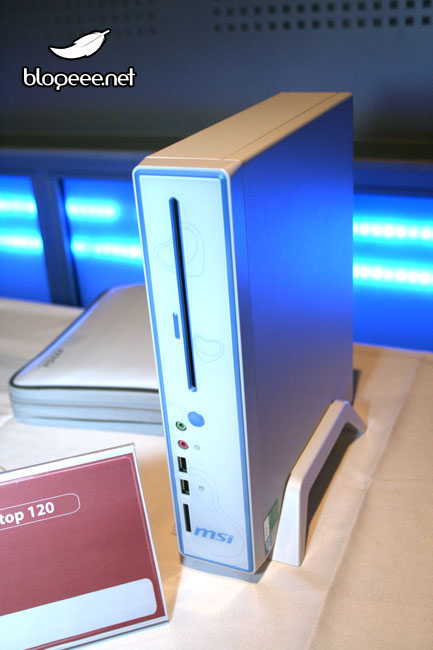
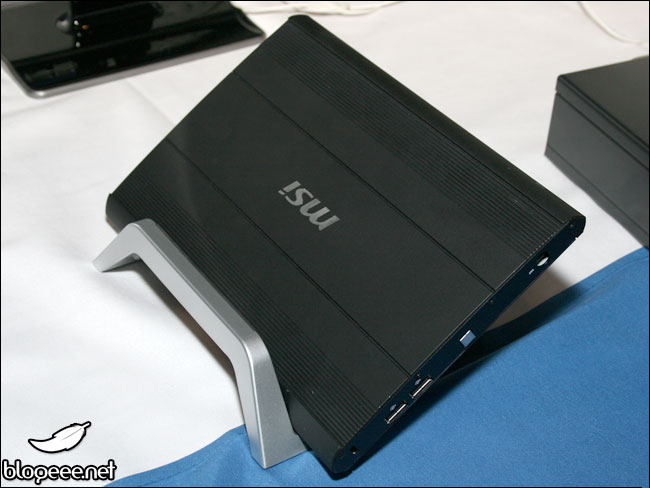
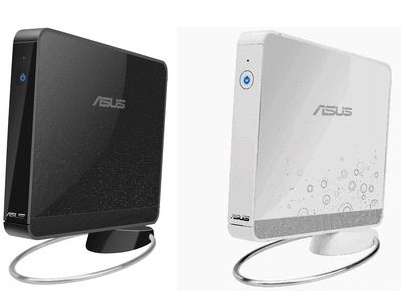
Here we still haven't seen the EeeBox nor the Eeetop, but in france they seem to get introcuced. But hey, Asus isn't the only company coming out with box's and top's. MSI have announced there new package for 2009. Guess what: a NetTop, a NetBox and a NetOne. Genius naming that is. Well let's just watch the pictures.
So first all the Eee's made by Asus
The EeeTop
The EeeBox
And then all the Wind's made by MSI
The Wind nettop 120 CS
The Wind Box
And the Netone M19
If you want to see some more picture or you want to find out the specs. And you know how to read French, then you might take a look at www.blogeee.net
2009 will be the year of the Box's and Top's
Thursday, November 27, 2008
From EeePC 701 to EeePC 901
Yep, my new EeePC has arrived. Why, you may ask. What's wrong with the old one? Well actually, nothing really. But, I needed a very cheap computer that I could use as a lightweight server. So I decided to use an Eee PC. Logically, I will use the old EeePC as server and the new one will become my UMPC.
Well here are some pictures. I could tell you all the differences, but google might help you as well.
This time it has bluetooth build in and a nice manager goes with it. Again I had to go for the French version, because I couldn't a Dutch version with Linux. So first thing I will be doing is changing the language. Not very hard to do, following the directions on this page. So let's try out our new minicomputer.
From EeePC 701 to EeePC 901
Thursday, November 6, 2008
Back to Xandros on the Eee PC
Yep, after testing a lot of other distro's I changed back to the good old stock Xandros. Seems to be the best choice after all. Don't get me wrong. Things like eeebuntu and ubuntu eee do work very good and are very easy to install. Well If you know your way around in Linux they are, but still.
So why did I go back to xandros? Boot speed. And that's all I have to say to it. No, really, When using this kind of computers, you want it to boot fast, very fast. Only Xandros seems to know how to make it happen. The reason I changed to other distro's was bluetooth, but now I have been able to set it up with Xandros.
An other thing I wanted, was Firefox 3. I only had to add a repository:
deb http://updates.xepc.org/ p701 mainand I was set to install Firefox 3.
So now I'm very pleased to surf the web with the latest browser, using a bluetooth mouse and I'm doing all this within 15 seconds. Why did I want to install an other distro again?
Back to Xandros on the Eee PC
Monday, November 3, 2008
Mobistar sells Asus Eee PC 701 SD - Linux
Yep, nice price isn't it? The Asus Eee PC 701 SD seems to have the same specs as the 8G. The only difference that I could find is the 10GB free web storage, you can't have with the older models and it has only 512 MB ram (the 8GB has 1 MB ram), but you can upgrade (Elaborate Chassis Design for Memory Upgrades)
Mobistar sells Asus Eee PC 701 SD - Linux
Tuesday, October 28, 2008
Medion mini nootbook 10' at ALDI Belgium
Yep, at "den Aldi" they have an offer starting at wednesday 29/10/2008 for the medion Mini notebook 10' for the nice price of 369,00 euro.
Specs in dutch because others don't really care I guess.
* Processor Intel® Atom™ 1,6 GHz
* 1 GB werkgeheugen
* harde schijf van 160 GB
* 10' breedbeeldscherm (ca. 25 cm, 1024 x 600 pixels)
* videokaart Intel® Graphics Media Accelerator 950
* geïntegreerde webcam en microfoon
* USB 2.0-poort
* multikaartlezer sd/mmc & ms (1)
* Wireles LAN 802.11 b/g +
* compleet softwarepakket met Windows® XP Home Edition (incl. Service Pack 3)
* keuze uit zwarte of witte behuizing
* incl. Bluetooth® dongle
* aansluitingen: multikaartlezer voor sd/mmc & ms, 3 x usb 2.0, 1 x vga out, 1 x netwerk (RJ45), 1 x microfoon, 1 x Line out
* incl. draagtas, Li-ion accu en netadapter
* afmetingen: ca. 260 x 180 x 19/31,5 mm
* gewicht: ca. 1,2 kg
3 jaar garantie
incl. 0,05 EUR Recupel
(1) geheugenkaarten niet inbegrepen
So, if you want a nettop, this might be a good choice, but I still prefer Asus Eee PC's
Medion mini nootbook 10' at ALDI Belgium
Tuesday, October 14, 2008
Asus Eee All-in-one touch screen
We all knew it would come, well here it is: the third child in the Eee Family. It isn't available yet, but you can pre-order it in the UK at play.com. Note that the don't ship outside the UK. The release date is set to 20/11/2008.
Ok, so what is it? Is it a bird, is it a plane? Nope, it's an nettop pc. Aaaaaaahhhh. Well actually it looks like some of those digitaal picture frames, but on this one, you can surf the web. And oh so many more things. Well not a whole lot more, but more. Well, ok, ... it's just a small pc squized into a picture frame. And it has a touch screen.
Specifications
* Processor: Intel ATOM (1.6GHz/533MHz FSB/512K Cache)
* Chipset: Intel 945GSE + ICH7M
* Memory: 1GB (DDR2 667)
* Storage: 160GB, SATAII 5400rpm
* Graphics Card: Shared Graphics (128MB)
* Operating System: Windows XP Home SP3
* ScreenSize: 15.6" (16:10 Wide Panel)
* Touch Screen: Single Touch Panel
* Webcam: 1.3 Mega Pixel
* Microphone: Digital Array Microphone
* Audio Chips: 2 x 4W Hifi Speaker + SRS
* Communication: 10/100/1000 Mbps Ethernet
* WLAN: WiFi 802.11b/g/n
* IO Side Ports: Memory card slot (SD/SDHC/MS/MS Pro) / USB ports x 2
* IO Rear Ports: Audio Ports x 3 (Microphone, Line in & Line Out) / USB ports x 4 / Gigabit LAN port
* AC Power: 19Vdc, 4.74A, 65W power adaptor
* Net Weight:4.3Kg
* Software: StarOffice, Adobe Reader 8.0, Norton Internet Security (90 day trial version), Express Gate, Skype, Eee Memo, SoftStyles, Eee Cam & Eee Cinema
* Keyboard + mouse: Wired Keyborad & Mouse
Asus Eee All-in-one touch screen
Wednesday, October 1, 2008
EEE box on PIXMANIA
For a long time now, I'm waiting for the new Asus baby to come out in Europe. Yep, I'm talking about the Eee box. They gave us a minisite, a commercial and it is even available in the US and Asia.
And what about Europe you might ask (well al least I do). Well it's coming my friends, it's coming this month to a shop near you (wherever that may be). I bought my Eee PC at pixmania and yes they sell the Eee box now too. But, they don't have it in stock.
Oh, what should I do, what should I do. It has a very nice price: € 229 + € 10 shipping = € 239,00 That's cheaper then all the dutch shops selling it. I'll wait some more, but I don't know how much longer I'll be able to resist.
And why do you need it, you ask? It is a perfect mythtvbox not for HD, but that isn't a problem. We simply don't have HD.
Ah and yes it comes with Windows XP, the Linux version doesn't seem to be available anywhere . Mmm, kind of weird.
EEE box on PIXMANIA
Monday, August 25, 2008
Eeestorage not for Eeepc 701 users
In an other post, I talked about the new online storage service from Asus. So, I went looking for the account activation code on my Eee PC User Manual. No code what so ever.
I mailed Asus Belgium with the question if I could get a code by email. And this is the answer (in dutch).
Geachte,
Alleen bij aankoop van de nieuwe 901 en 1000 modellen met SSD schijfen wordt dit geleverd. Het is niet mogelijk om zoiets los te verkrijgen.
Best regards / Met vriendelijke groet,
Asus TSD
Translated this means: You only get a code when you buy a 901 and 1000 model and NO you can not get a code seperate.
Mmm, no online storage for us 701 users, who started the asus hype. Nice way to go Asus.
Eeestorage not for Eeepc 701 users
Thursday, August 21, 2008
Linpus lite better than Xandros for Eee PC?
Acer has decided to use Linpus lite as there standard OS on there Aspire one.
Because I don't own an Aspire one and I'm not going to buy one, I was interested in trying Linpus on the Eee PC. It has been done and there even is a video on it.
So that gave some good hope. Now as we all know, the drivers are the thing to worry about. A good place to start looking for info is the eeeuser forum, so I did. Last post on the topic dates from 2008-04-21 11:58:42 am. Mmm, not very good.
So let's google on it ... Nothing, no one seems to have linpus on there Eee pc with all hardware working. Conclusion: Stick to your xandros or if you don't mind boot times over 60 sec. go for eeebuntu Netbook Remix
Linpus lite better than Xandros for Eee PC?
Tuesday, August 19, 2008
Eeestorage - online harddrive by Asus
Well Asus has something new:
According to a report, the computer-maker has launched a service called Eee Storage, which provides 20GB of online storage for Eee PC users, as well as access to downloads of around 3,000 pieces of free software and games. The company hopes to expand the service -- which uses a drag and drop interface for file management -- into a full blown "store" where users can download music and "various other content."
So let's check that new thing out: http://www.eeestorage.com/

So what do they promise:
- 20GB Ultra Luxurious Storage Capacity
- Most Intuitive File Management
- groupshare
- downloadcenter
- security
Mmm, smells good, but hey what is this, I found in the Terms of Service:
eCareme Technologies, Inc. ("eCareme") will provide at least 18 months of free services, but remains the right to charge on the services in the future. Changes to charging conditions will be published on our website and made known through e-mails to "Full Account" members who provide e-mail addresses. We will then request our members to confirm the registration data and pay the charges in a specific period. If you do not pay the charges in the given time, we will assume that you give up your membership and will terminate the Service.
You acknowledge and agree that we may provide 18 months of free services, but remain the right to terminate such services after that period. If we decide to terminate the Service due to certain reasons in the future, the announcement will be made on our website 90 days prior to the termination. E-mail notifications will be sent to “Full Account” members who provide e-mail addresses. Please make sure that you backup your data frequently to protect your rights.
The "it's free for now, but we will charge you later on" policy does smell a bit burned doesn't it? But still, let's try this, you never know ... where is my Eee PC User Manual for the account activation code.
Eeestorage - online harddrive by Asus
Wednesday, August 6, 2008
Asus Eee Box commercial
Watch it, love it and then get it.
ASUS EeeBox advertisement. from Blogeee.net on Vimeo.
Asus Eee Box commercial
Asus Eee box review
Well I keep searching the net for a good review on the Asus Eee box and yes I finally found one. Go have a look at the hothardware site. A very nice review indeed.
Well maybe you just want to read the synopsis, or you just want to see a video spotlight. Enjoy, they expect it to be out on august 11. Nice, Europe don't get behind.
Asus Eee box review